A fasting timer that keeps the record straight.
Start a fast, see what is left, fix a time you forgot, and keep your fasts beside your food and training. The timer is free and never expires.


Free: unlimited food search, barcode scanning, and workout logging. No ads.
Premium: $1.99/month or $14.99/year for Coach, AI logging, and full history. 7-day free trial for new subscribers where available.
- Free timer
- 12:12, 14:10, 16:8, and a custom eating window.
- Lock Screen
- An iPhone Live Activity counts down for you.
- Editable
- Fix a start or end time up to 7 days back.
- Not advice
- Presets are timer lengths, not recommendations.
How does the fasting timer work?
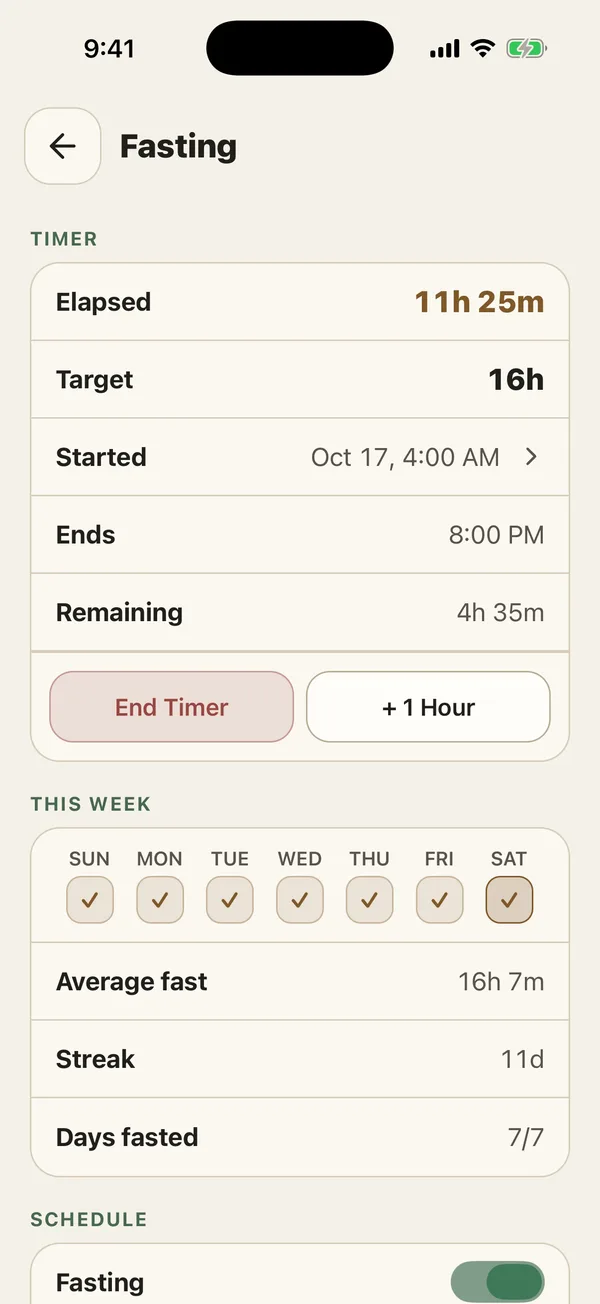
Pick a preset, press Start, and the timer shows elapsed time, your target, when you started, the clock time it ends, and what is left. Add an optional note when you start if you want to remember why a fast went the way it did.
Need longer? Tap +1 Hour. Done early? End Timer asks once before it closes the fast, so a stray tap does not end it. When you reach your target, PlateStack sends a notification.
- Open Fasting from Home or the + button.
- Choose a preset. 16:8 is the default.
- Press Start. The Live Activity appears on iPhone.
- End the timer when you eat, or extend it by an hour.
Which fasting schedules can I track?
Fasting schedules are usually written as hours fasting to hours eating. 16:8 means a 16-hour fast and an 8-hour eating window. The National Institute on Aging calls eating within a limited number of hours each day time-restricted feeding, one of several fasting patterns researchers study, and in its 2018 review said there was not enough evidence to recommend any of them to the public.
PlateStack treats these as timer lengths, nothing more. We do not tell you which one to choose.
-
Free
12:12, 14:10, 16:8, and a custom eating window.
-
With Premium
18:6, 20:4, OMAD (23:1), and 5:2, which PlateStack runs as a 24-hour timer.
-
Schedule
Set when your fast and eating window start. It adds an automatic “Complete a Fast” habit.
How do I see my fasting history?
Under the timer, This Week shows a tick for each day you fasted, your average fast, your current streak, and days fasted out of seven. All of that is free, along with your last 7 completed fasts.
Forgot to stop the timer last night? Tap any fast to edit its start or end time, up to 7 days back. Your history stays honest without starting over.
Premium adds full history and fasting analytics: how many fasts reached their target, your longest streak, your average, the last 14 fasts as a chart, and which days of the week you fast most.
How does fasting fit with the rest of my log?
A fast sits beside your food, training, and habits, so you can see a 16:8 day next to what you ate and how you trained. A completed fast fills the automatic “Complete a Fast” habit once you turn on a schedule, and starting or ending a fast counts as activity for your daily streak.
The fast itself earns no XP and no score. PlateStack rewards keeping a record, never hitting a number. See how habits and food logging fit around it.
Common questions.
- Is the PlateStack fasting timer free?
- Yes. The timer, the 12:12, 14:10, and 16:8 presets, a custom eating window, the end-of-fast notification, the week view, and your last 7 fasts are free. Premium adds 18:6, 20:4, OMAD, and 5:2 presets, full history, and fasting analytics.
- Can I fix a fast I forgot to start or stop?
- Yes. Tap Started on a running fast, or any fast in your history, and edit the start or end time. Edits reach back up to 7 days and never into the future.
- Does the timer start on its own?
- No. The schedule sets your fasting and eating times, but a fast starts when you press Start, so the record matches what you actually did.
- Can I see my fast on the Lock Screen?
- On iPhone, yes. A Live Activity shows elapsed time and time left on the Lock Screen and in the Dynamic Island, and updates when you extend or edit the fast.
- Does PlateStack recommend a fasting schedule?
- No. The presets are timer lengths, not recommendations. Whether fasting suits you is a question for your doctor.
Sources
- Calorie restriction and fasting diets: What do we know? (National Institute on Aging, NIH)
Start the next fast here.
Install PlateStack and press Start. The timer, the week view, and your last 7 fasts are free.
Free: unlimited food search, barcode scanning, and workout logging. No ads.
Premium: $1.99/month or $14.99/year for Coach, AI logging, and full history. 7-day free trial for new subscribers where available.