Water, logged in one tap.
Tap once per glass, set a goal that fits your day, and see the week at a glance, beside your food and training. Free and unlimited.

Free: unlimited food search, barcode scanning, and workout logging. No ads.
Premium: $1.99/month or $14.99/year for Coach, AI logging, and full history. 7-day free trial for new subscribers where available.
- One tap
- A glass, a bottle, or any amount.
- Your goal
- Set in ml or fl oz. No default number.
- History
- 7 and 30 days, with your average.
- Free
- No limit on Starter.
How does water tracking work?
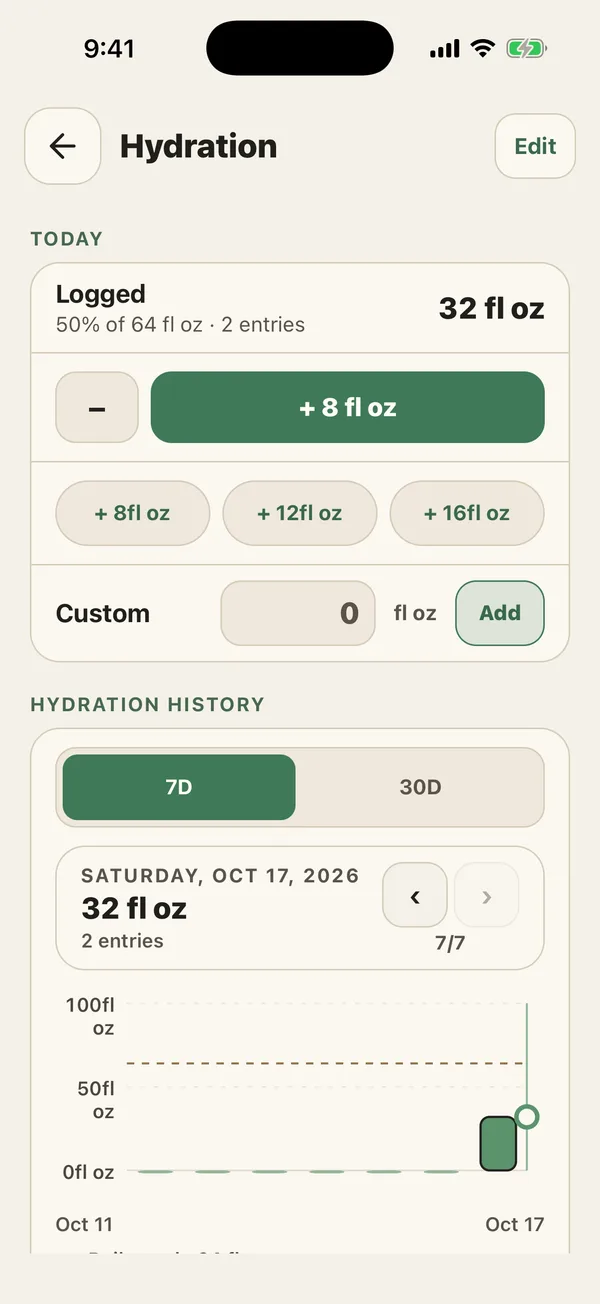
Open Hydration and tap the big button to add a glass. The smaller buttons add bigger bottles, and Custom takes any amount. Tapped one too many? The minus button removes your last entry.
Today’s total sits at the top with the share of your goal you have reached. Pick millilitres or fluid ounces, whichever your bottle says.
- Set a daily goal in hydration settings, or pick a preset.
- Tap + each time you finish a glass or bottle.
- Check the history to see your average and the days you reached your goal.
How do I choose a daily water goal?
There is no single right number. The CDC says daily water needs vary by age, sex, activity level, pregnancy, and breastfeeding, and that you need more in hot weather, when you are more active, or when you are sick. Plain water counts toward your total, and so do other drinks and water-rich foods.
That is why PlateStack starts with no goal. Choose one that fits your day, adjust it on training days if you like, and treat it as a reminder rather than a rule.
How can I log water faster?
Skip opening the app. On iPhone, the PlateStack widget on your Home Screen has a Log water button, Siri can log a glass for you, and on an Apple Watch paired with your iPhone, the water row adds one from your wrist.
Want a nudge? Turn on the daily water reminder and set a time.
What does the water history show?
Switch between 7 and 30 days to see each day’s total against your goal, your daily average, how many days you reached the goal, and your best day.
Once you set a goal, the automatic “Reach Water Goal” habit fills itself on the days you hit it. See how that works in the habit tracker.
What does it not do?
Water stays in PlateStack: it is not read from or written to Apple Health or Health Connect. It tracks what you drink, not how hydrated you are; nothing in the app measures that.
Swipe to see both tiers.
| Feature | Starter ($0) | Premium |
|---|---|---|
| Hydration log | Yes | Yes |
| Reminders | 1 active | Unlimited |
| Home Screen and Lock Screen widgets (iPhone) | Yes | Yes |
| Apple Watch app and complications (iPhone) | Yes | Yes |
Premium is $1.99 a month or $14.99 a year. The pricing page lists every feature on both tiers.
Common questions.
- Is the water tracker free?
- Yes. Water logging, your daily goal, and 7- and 30-day history are free on Starter, with no limit.
- How much water should I drink a day?
- PlateStack does not set a number for you. The CDC notes that needs vary by age, sex, activity, pregnancy, and breastfeeding, and you need more in heat, during exercise, or when ill. Choose a goal with that in mind, or ask your doctor.
- Can I log water without opening the app?
- On iPhone, yes: the Home Screen widget has a Log water button, Siri can log a glass, and the Apple Watch app adds one from your wrist when your iPhone is nearby.
- Does PlateStack sync water with Apple Health or Health Connect?
- No. Water stays in PlateStack and is not read from or written to either health app.
- Can PlateStack remind me to drink water?
- Yes. Turn on the daily water reminder and choose a time. On Starter it counts as your 1 active reminder.
Sources
- About Water and Healthier Drinks (Centers for Disease Control and Prevention)
Log your next glass.
Install PlateStack, set a goal, and tap once per glass. It sits beside your meals, so a day’s record is in one place.
Free: unlimited food search, barcode scanning, and workout logging. No ads.
Premium: $1.99/month or $14.99/year for Coach, AI logging, and full history. 7-day free trial for new subscribers where available.