Plan the week against your targets.
Lay out the next seven days, see each day’s calories and macros before you eat them, and let Coach draft a starting point. Meal planning is part of Premium.


Free: unlimited food search, barcode scanning, and workout logging. No ads.
Premium: $1.99/month or $14.99/year for Coach, AI logging, and full history. 7-day free trial for new subscribers where available.
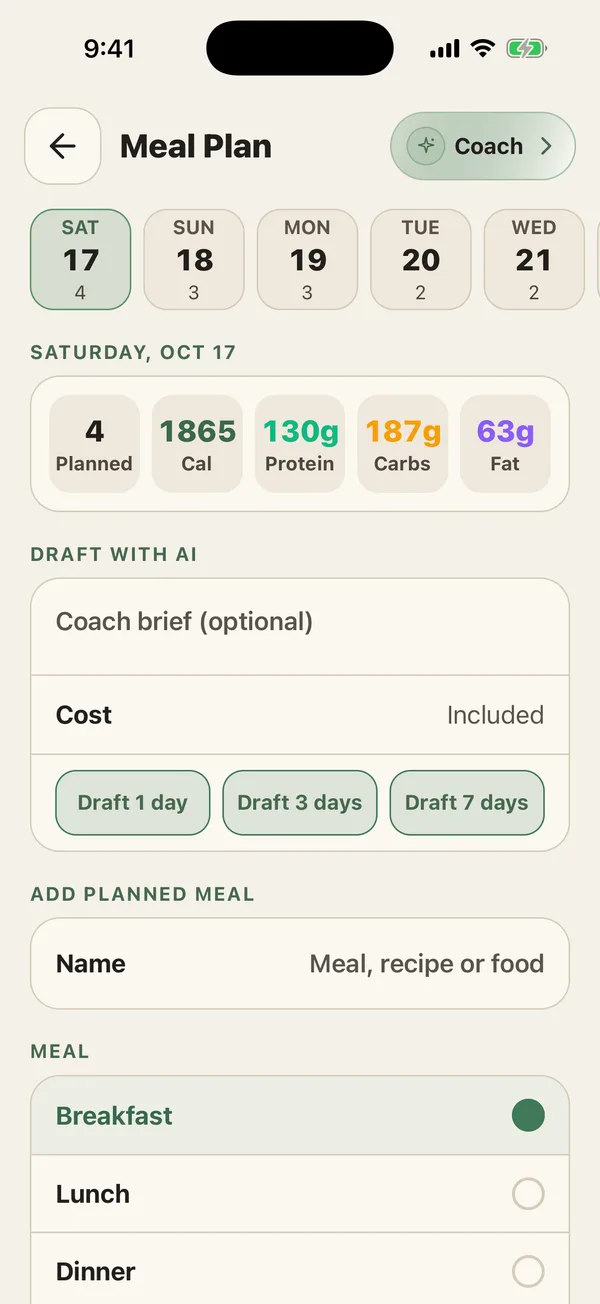
- Seven days
- Today and the six after it.
- Totals per day
- Calories, protein, carbs, and fat.
- AI drafts
- 1, 3, or 7 days from your targets.
- Premium
- The grocery list and recipes stay free.
How does the meal planner work?
Meal Plan shows today and the six days after it. Each day lists what you planned and adds up the calories, protein, carbs, and fat, so you can see whether Thursday fits your targets before Thursday arrives.
Add a planned meal by name, from a recipe, or from a food, and put it under breakfast, lunch, dinner, or a snack. Changed your mind? Move a meal to the next slot or remove it.
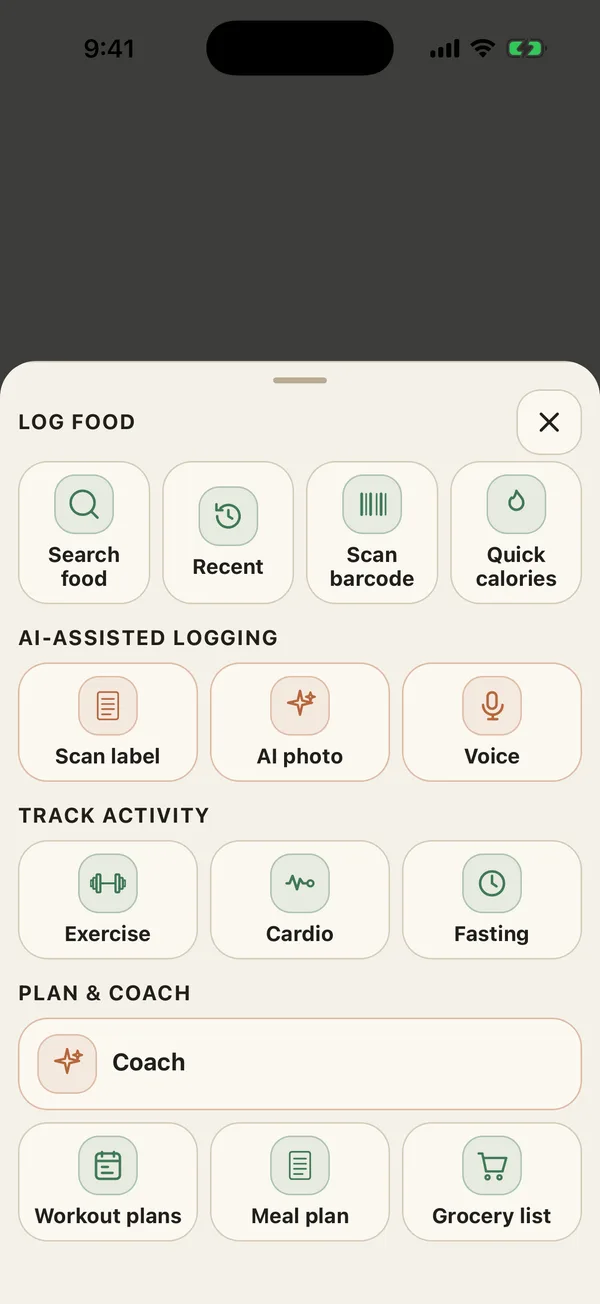
- Open Meal Plan from the + button or the Plans tab.
- Pick a day at the top.
- Add a meal, recipe, or food, and choose the meal it belongs to.
- Watch the day’s totals update against your targets.
How do AI meal plan drafts work?
Tap Draft 1 day, Draft 3 days, or Draft 7 days. PlateStack Coach builds the plan from your calorie and macro targets and your meal split. Add a short brief if you want to steer it: “no fish”, “quick lunches”, “high-protein breakfasts”.
The draft lands in your plan right away. Treat it as a starting point: keep what you like, move what does not fit, and remove the rest.
One rule is built in: if your target is below a conservative intake floor, PlateStack will not draft a plan to hit it.
How do I go from plan to log?
We keep the plan and the log separate on purpose. The plan is what you meant to eat; the log is what happened. When you eat a planned meal, log it the usual way. Food logging makes that quick: a saved meal or recipe is one tap, and recent foods sit under each meal on Home.
Planning tip: plan the meals you repeat, not every bite. Two or three fixed meals a day make the week easier to hit and easier to shop for.
How does the grocery list work?
The grocery list is free. Add items by hand, sorted into categories like produce and dairy, or add a saved recipe’s ingredients all at once. Tick items off as you shop and clear them when you are done.
It does not yet build itself from your meal plan. For now, the recipe button is the fast path.
Common questions.
- Is meal planning free in PlateStack?
- No. Meal planning, including AI drafts, is part of Premium. The grocery list, recipes, and saved meals are free on Starter.
- Can PlateStack write a meal plan for me?
- With Premium, yes. Coach drafts 1, 3, or 7 days from your targets and meal split, plus an optional note about what you like. You can move or remove any planned meal afterwards.
- Does a planned meal log itself?
- No. A plan is your intention, and the log is what you ate. When you eat a planned meal, log it from search, a saved meal, or the recipe.
- Does the grocery list fill itself from my plan?
- Not yet. Add items by hand, sorted into categories, or add a recipe’s ingredients in one go. The grocery list is free.
- Will the AI plan below a safe calorie level?
- No. If your target sits below a conservative intake floor, PlateStack refuses the draft before any credit is used.
Start with the log.
Install PlateStack free, log a week of meals, and add Premium when planning the next one is worth it to you.
Free: unlimited food search, barcode scanning, and workout logging. No ads.
Premium: $1.99/month or $14.99/year for Coach, AI logging, and full history. 7-day free trial for new subscribers where available.