Your day, on your wrist.
The PlateStack watch app shows calories and protein left, logs water and sets, and lets you dictate a meal and review it before it counts. It works with your iPhone.


Free: unlimited food search, barcode scanning, and workout logging. No ads.
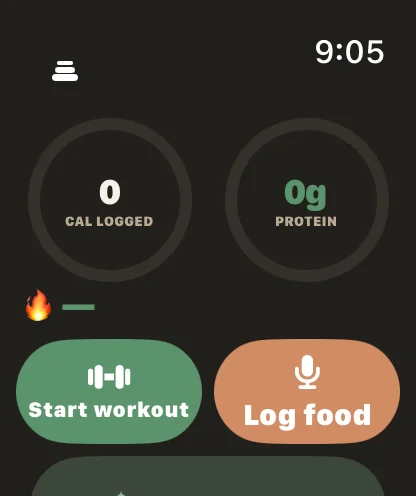
- Two rings
- Calories left and protein left.
- Sets from the wrist
- Reps, weight, RIR, and the rest timer.
- Review before logging
- Dictated food shows an estimate first.
- Needs your iPhone
- Not a standalone app. Free on Starter.
What does the watch show at a glance?
The front screen is today: two rings for calories left and protein left, side by side, so one glance covers both numbers that decide what you eat next. Under them is a water row with a one-tap add.
Complications put the essentials on the watch face. Depending on the size you pick, they show your current workout and rest state, or your streak, or today’s numbers.
-
Calories and protein
Two rings, remaining for the day against your targets.
-
Water
One tap adds your usual amount.
-
Complications
Circular, rectangular, and inline versions for the watch face.
How do I log a workout from my wrist?
Start the next planned day from the watch. The button names the day, so you know what you are about to start. During the workout the screen shows the current exercise and the set values: reps, weight, and RIR, each adjustable. Log the set and the rest timer starts.
The rest timer has +30s and Skip. You can pause and resume, and when every planned set is logged you save the workout from the watch. While it runs, the watch shows your heart rate and active calories, and the finished workout is saved to Apple Health if you have connected it.
- Open PlateStack on the watch and tap the planned day.
- Adjust reps, weight, and RIR if they differ from the plan, then log the set.
- Use +30s or Skip while the rest timer runs.
- When the last set is logged, save the workout.
Can I log food on the watch?
Yes, two ways. Saved foods log in a tap. For anything else, tap Log food and dictate it. The watch shows an estimate with Log and Cancel, so you review it before it counts, and Undo is there if you tap too fast.
A dictated food is one AI credit on Starter. It is an estimate and can be wrong. Siri does the same job from the iPhone.
What does the watch need from my iPhone?
The iPhone does the work. It holds your record, runs the AI estimate, and syncs. The watch app is the remote control and the small screen, so it needs the paired iPhone nearby and is not a standalone app. If the watch cannot refresh from the phone, it says so and offers Open on iPhone.
Is it free?
Yes. The Apple Watch app and its complications are on Starter.
| Feature | Starter ($0) | Premium |
|---|---|---|
| Apple Watch app and complications (iPhone) | Yes | Yes |
| Live Activities (iPhone) | Yes | Yes |
| Rest timer and plate calculator | Yes | Yes |
Premium is $1.99 a month or $14.99 a year. The pricing page lists every feature on both tiers.
Common questions.
- Do I need my iPhone to use the PlateStack watch app?
- Yes. The watch app works with your iPhone, which keeps your record. It is not a standalone app.
- Can I log a set from my wrist?
- Yes. During a workout the watch shows the current exercise with reps, weight, and RIR you can adjust, then logs the set. It also runs the rest timer, with +30s and Skip.
- Can I log food on the watch?
- Yes. Tap Log food, say what you ate, and the watch shows an estimate to review. Nothing is logged until you tap Log, and Undo is there afterward. It uses 1 AI credit, the same as a Siri food phrase. Saved foods and water use none.
- Does the watch app record heart rate?
- During a workout you start on the watch it shows your heart rate and active calories, and the finished workout is saved to Apple Health. Apple Health access is optional and asked for when you connect.
- Is there a Wear OS app?
- No. The watch app is for Apple Watch paired with an iPhone. Android has a Health Connect integration instead.
- Is the watch app free?
- Yes. The Apple Watch app and complications are part of the free Starter tier.
Leave the phone in your bag.
Install PlateStack on an iPhone with an Apple Watch paired. If you lift, read how the strength log works.
Free: unlimited food search, barcode scanning, and workout logging. No ads.