Your timers, on the Lock Screen.
On iPhone, the rest timer between sets and your fasting clock stay on the Lock Screen and in the Dynamic Island, so you do not have to open the app to check them.


Free: unlimited food search, barcode scanning, and workout logging. No ads.
- iPhone only
- On Android the rest timer has its own notification.
- Lock Screen buttons
- +30s, Skip rest, and Log set.
- Keeps counting
- iOS draws the clocks, so closing the app does not stop them.
- Free
- Part of Starter.
What does the workout Live Activity show?
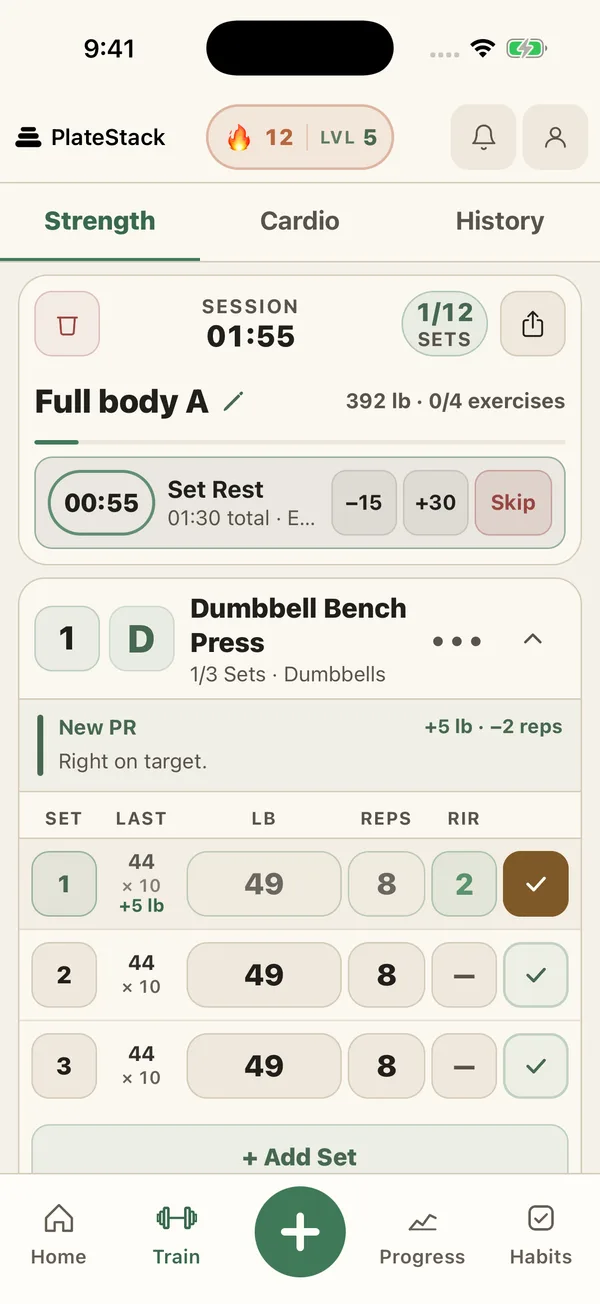
Start a workout and a card appears on your Lock Screen. While you lift it shows the workout clock, the exercise you are on, and how many sets you have done out of the sets planned. When you finish a set and the rest timer starts, it switches to the rest countdown and tells you which exercise is next.
The countdown turns to a warning color for the last ten seconds, so a glance across the bench is enough.
What does the fasting Live Activity show?
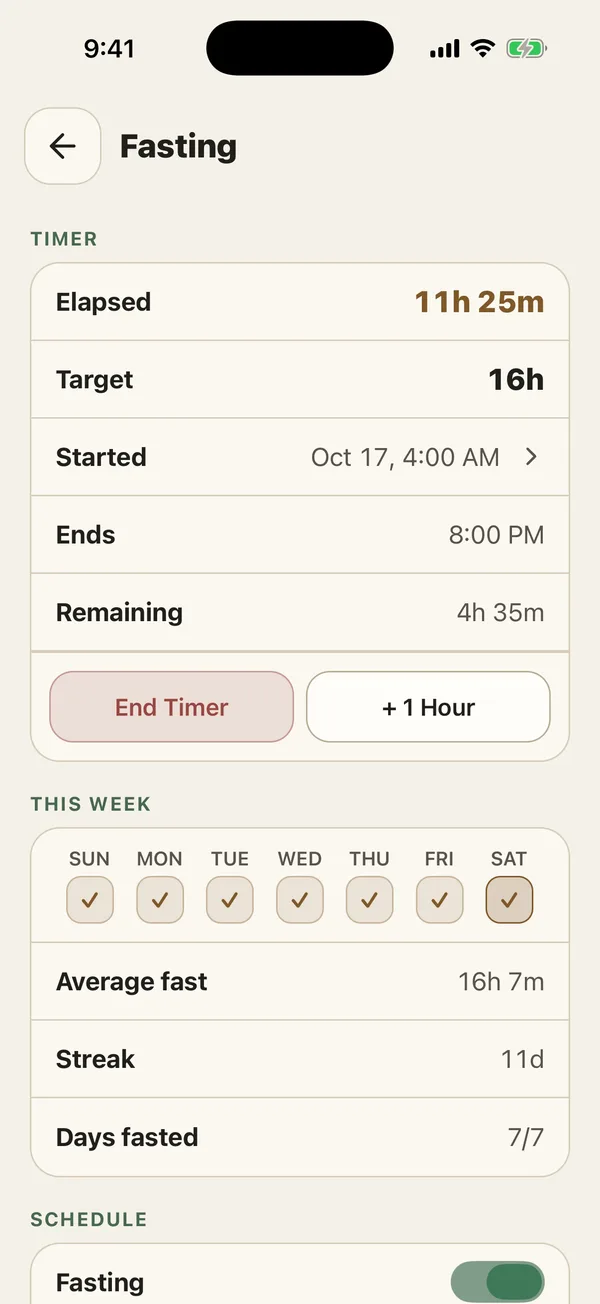
Start a fast and the same kind of card shows how long you have been fasting, how long is left, and your plan, such as 16:8 with a 16 hour target.
It does not vanish when you reach the target, because that is the moment you most want to see the number. It switches to a target met look and keeps counting up until you end the fast.
How do I get it, and how do I turn it off?
Live Activities need an iPhone. The first time one starts, iOS asks whether to allow Live Activities from PlateStack. If you would rather not have them, switch them off for PlateStack in the iOS Settings app. The workout log and the fasting timer work exactly the same inside the app.
Anyone who can see your Lock Screen can see what is on the card, such as the exercise name, so decide with that in mind.
Is it free?
Yes. The rest timer, the workout card, and the fasting clock are part of the free Starter tier.
| Feature | Starter ($0) | Premium |
|---|---|---|
| Live Activities (iPhone) | Yes | Yes |
| Rest timer and plate calculator | Yes | Yes |
| Fasting timer | Yes | Yes |
Premium is $1.99 a month or $14.99 a year. The pricing page lists every feature on both tiers.
Common questions.
- What is a Live Activity?
- A live card that iOS keeps on your Lock Screen and, on iPhones that have one, in the Dynamic Island. PlateStack uses it for your workout rest timer and your fasting clock, so you can check them without opening the app.
- What buttons are on the workout Live Activity?
- During rest, +30s and Skip rest. While you are lifting, Log set, with the reps and weight of your next planned set. The buttons are on the Lock Screen card.
- Does the fasting Live Activity have buttons?
- No. It shows how long you have fasted, how long is left, and your plan. Tap it to open the fasting screen.
- Do the timers keep running if PlateStack is closed?
- Yes. iOS counts them from a start and end time, so they do not depend on the app staying open.
- Is it on Android?
- No. Live Activities are an iPhone feature. On Android, the rest timer has its own notification with +30s and Skip.
- Can I turn it off?
- Yes. iOS lets you switch Live Activities off for PlateStack in Settings. Everything still works inside the app.
Lift without checking your phone.
Install PlateStack, start a workout, and lock the screen. The timer is already there. See how the strength log works.
Free: unlimited food search, barcode scanning, and workout logging. No ads.